The test video is Andrej Karpathy's Intro to Large Language Models: 59 minutes, about 12,000 spoken words, and a chapter list in the description. The prompt was the same every time:
Summarize this video in 5 bullet points, each with the timestamp where it's discussed: https://www.youtube.com/watch?v=zjkBMFhNj_g
Method 1: paste the link
ChatGPT searched the web and gave back a clean, confident summary:
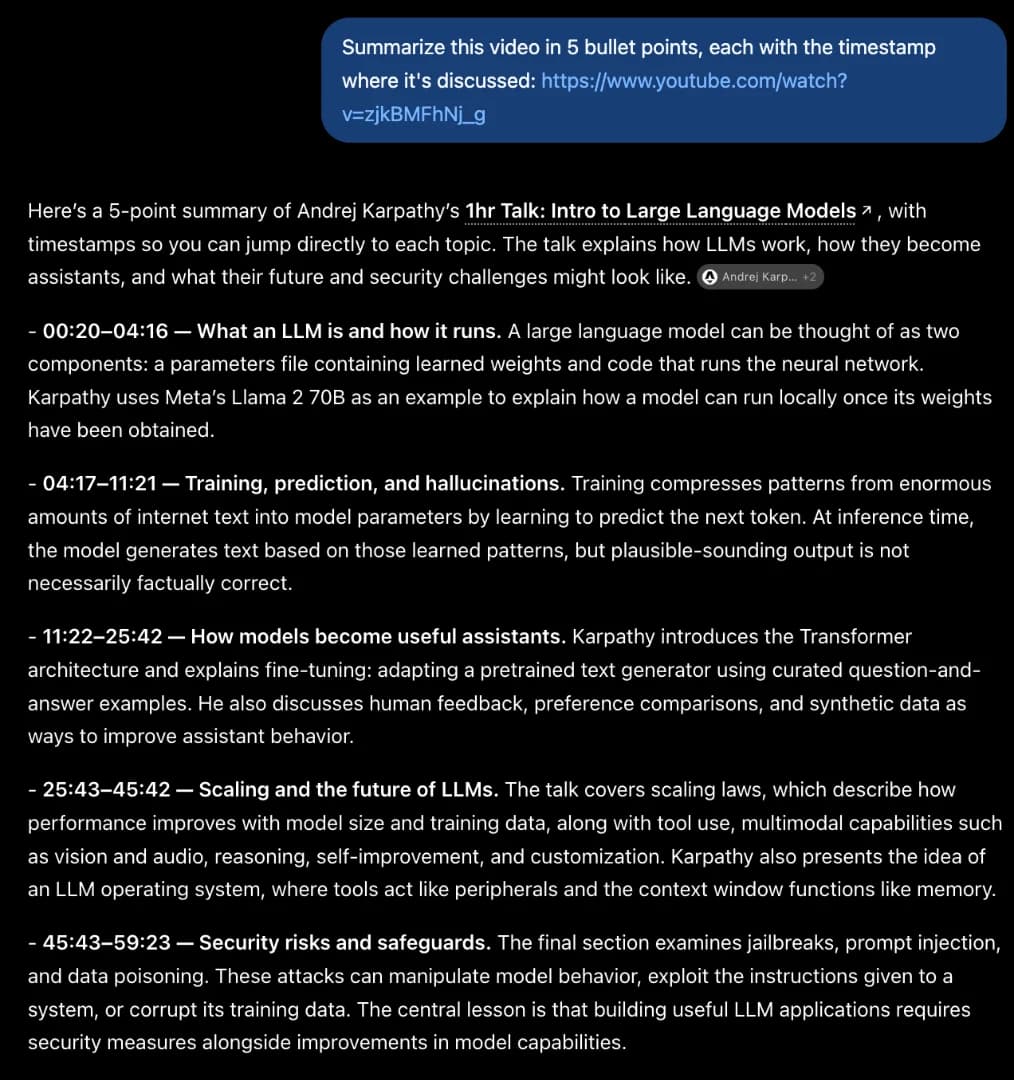
Look at the timestamps: 00:20, 04:17, 11:22, 25:43, 45:43. Those are the chapter markers Karpathy typed into the description. The bullet text comes from the chapter titles and from articles about the talk. Nothing in it requires having heard the video, and nothing in it goes beyond what the description already says. There is no 140 GB parameters file, no 6,000 GPUs, no $2M training run.
That works for a famous talk. On a video without chapters, or with a question more specific than “summarise”, ChatGPT runs out of material. In our test on a smaller channel it replied that it could not verify the content and asked us to paste the transcript.
Method 2: paste the transcript
This works on every plan, Free included:
- Paste the link into the free YouTube transcript tool and copy the result. Keep the timestamps.
- In ChatGPT, write your prompt, then paste the transcript under it.
Now the summary is built from what was said. The cost is the copying: one video at a time, by hand. If you only want the summary and not the chat, the free YouTube summarizer does both steps for you.
Method 3: a transcript connector
With TranscriptAPI connected as a custom MCP server, ChatGPT fetches the transcript itself whenever you paste a link. Setup takes about three minutes and is in How to get a YouTube transcript in ChatGPT. The catch: OpenAI offers custom MCP servers on Pro, Business and Enterprise, not on Plus or Free.
Here is the same prompt with the transcript tool connected (in Claude, which uses the same server):
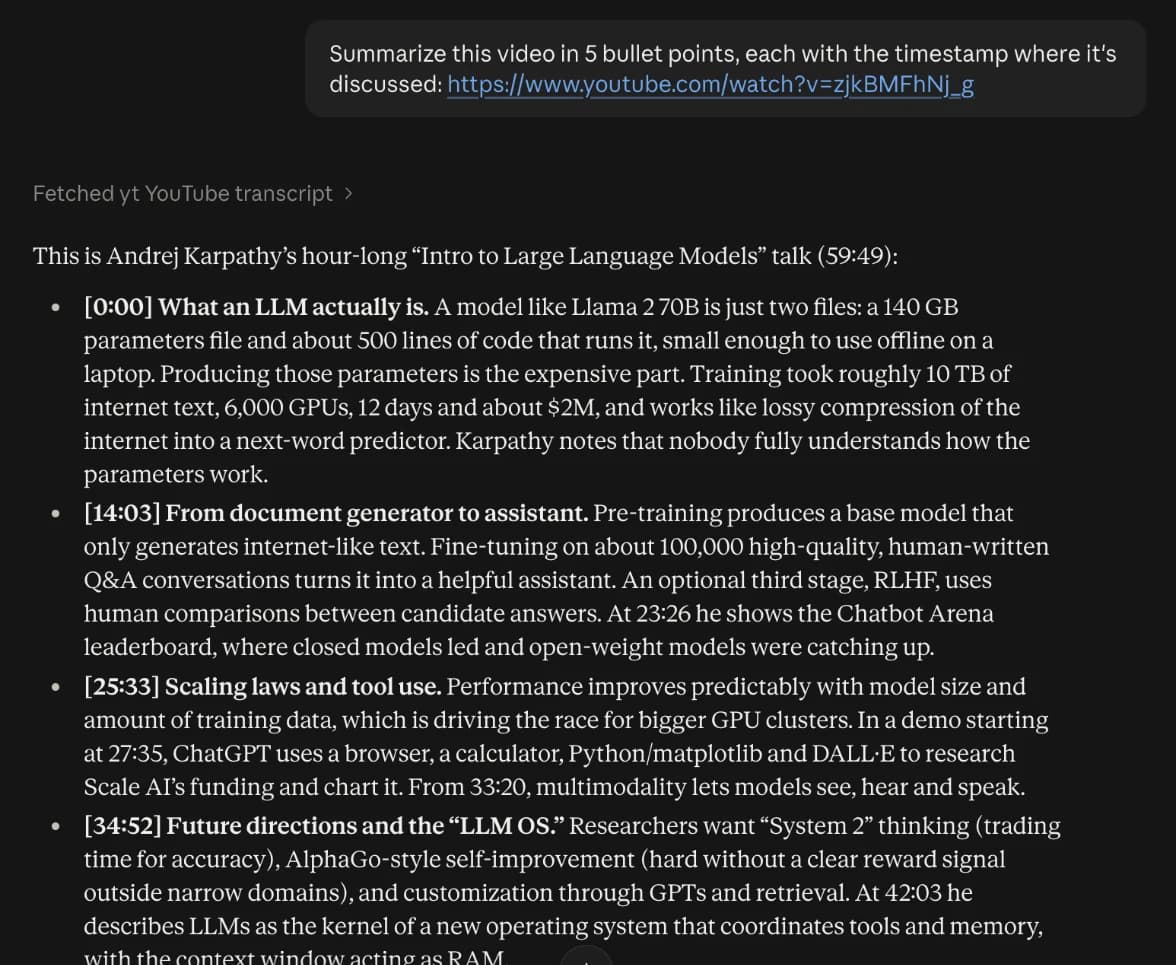
The timestamps now point at moments in the talk rather than at chapter starts, and the bullets carry facts you only get by listening. The connector can also do things copy-paste can't, like listing a channel's last ten uploads and summarising each one.
Which one to use
- Just want the gist of a well-known video? Paste the link. Treat the timestamps as chapter starts.
- Need it accurate, on Plus or Free? Paste the transcript.
- Summarise videos regularly, or whole channels? The connector.
Prompts that give useful summaries
“Summarise this” gets you a book report. Saying who the summary is for gets you something you can use:
Summarize this for someone deciding whether to watch it: what is the main claim, what evidence does it give, and which 10 minutes are worth watching?
List every concrete number, tool and recommendation in this video, each with its timestamp.
Summarize this as meeting notes: decisions, open questions, action items.
Where does the speaker change their mind or contradict an earlier point? Quote both places.
Summarize each of the last 5 uploads from @channel in 3 bullets and tell me which one covers X.
The last prompt needs the connector, which lists the channel first and then reads each video.
Frequently asked questions
Can ChatGPT summarize a YouTube video from just the link?
It will produce a summary, but from a web search: the title, description, chapter markers and articles that mention the video. For a well-known video with chapters this looks convincing. For details, quotes or small channels it is guesswork, and ChatGPT will often say it cannot verify the content.
How long a video can ChatGPT summarize?
A one-hour talk is roughly 10,000–12,000 words of transcript, which fits comfortably. For multi-hour streams, ask for a summary per hour or per chapter so details are not squeezed out.
Is there a way without ChatGPT at all?
Yes. The free YouTube summarizer at transcriptapi.io/tools/youtube-summarizer reads the transcript and writes the summary in one step.
Can I summarize a whole channel or playlist?
With the TranscriptAPI connector, yes: ChatGPT can list a channel's uploads or a playlist and read each transcript. Each transcript costs one credit; ones you have already fetched are free.