What ChatGPT does with a YouTube link
We asked ChatGPT a specific question about a one-hour sourdough video: what rule of thumb does the baker give for temperature, with a quote and a timestamp. It searched the web, found general advice from a baking site, and then said this:
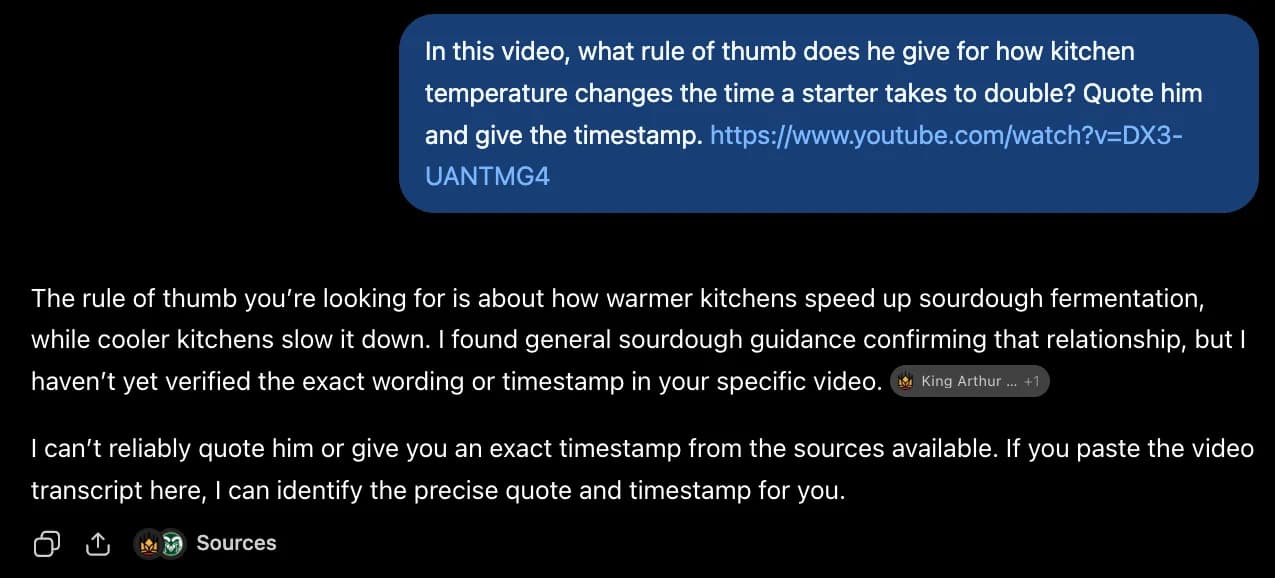
That is the honest version. On a famous video the answer looks much better, and that is the trap. Ask for a summary of Andrej Karpathy's Intro to Large Language Models and you get five tidy bullets with timestamps. Those timestamps are the video's chapter markers from the description: 00:20, 04:17, 11:22, 25:43, 45:43. ChatGPT summarised the table of contents, not the talk.
ChatGPT does say so itself: “If you paste the video transcript here, I can identify the precise quote.” So there are two ways to do that: by hand, or automatically through a connector.
Which way works on your plan
- Pro: custom MCP server with read/fetch access. That is all a transcript needs, so the connector below works fully.
- Business: admins and owners can add it from Plugins and publish it for the workspace.
- Enterprise / Edu: admins, plus any member an admin grants the permission to.
- Plus and Free: custom MCP servers are not offered. Use the copy-paste method further down. It takes ten seconds per video.
This is the state of OpenAI's help center in October 2026. The menu has moved twice this year (it used to be under Settings → Connectors → Advanced → Developer mode). If your screen looks different, look for Plugins or Apps and an option to add a custom MCP server.
Connect TranscriptAPI to ChatGPT (Pro, Business, Enterprise)
1. Get a key
Sign in at transcriptapi.io/login and copy the key from your dashboard. It starts with ta_. The free key comes with 20 credits and doesn't need a card.
2. Add the server
In ChatGPT on the web, open Plugins, press +, then Add custom MCP server. Fill it in like this:
TranscriptAPI
https://api.transcriptapi.io/mcp/ta_your_key
Replace ta_your_key with your key. The key goes in the URL because ChatGPT can't send custom headers, so leave authentication off: there's no OAuth step. Tick I understand and want to continue and choose Create as a plugin. ChatGPT scans the server and should list five tools:
get_youtube_transcriptreads what is said in a video, with timestampssearch_youtubefinds videos by keywordget_channel_videoslists a channel's latest uploadssearch_channel_videosfinds the video where a channel talks about Xget_playlist_videoslists a playlist in order
If the scan fails, the key is almost always the cause: a missing ta_, or a space pasted after it.
3. Use it
Start a new chat, type @, pick TranscriptAPI, and ask your question with the link. In ChatGPT the plugin applies to the message you mention it in, so @ it again when a follow-up needs a different video.
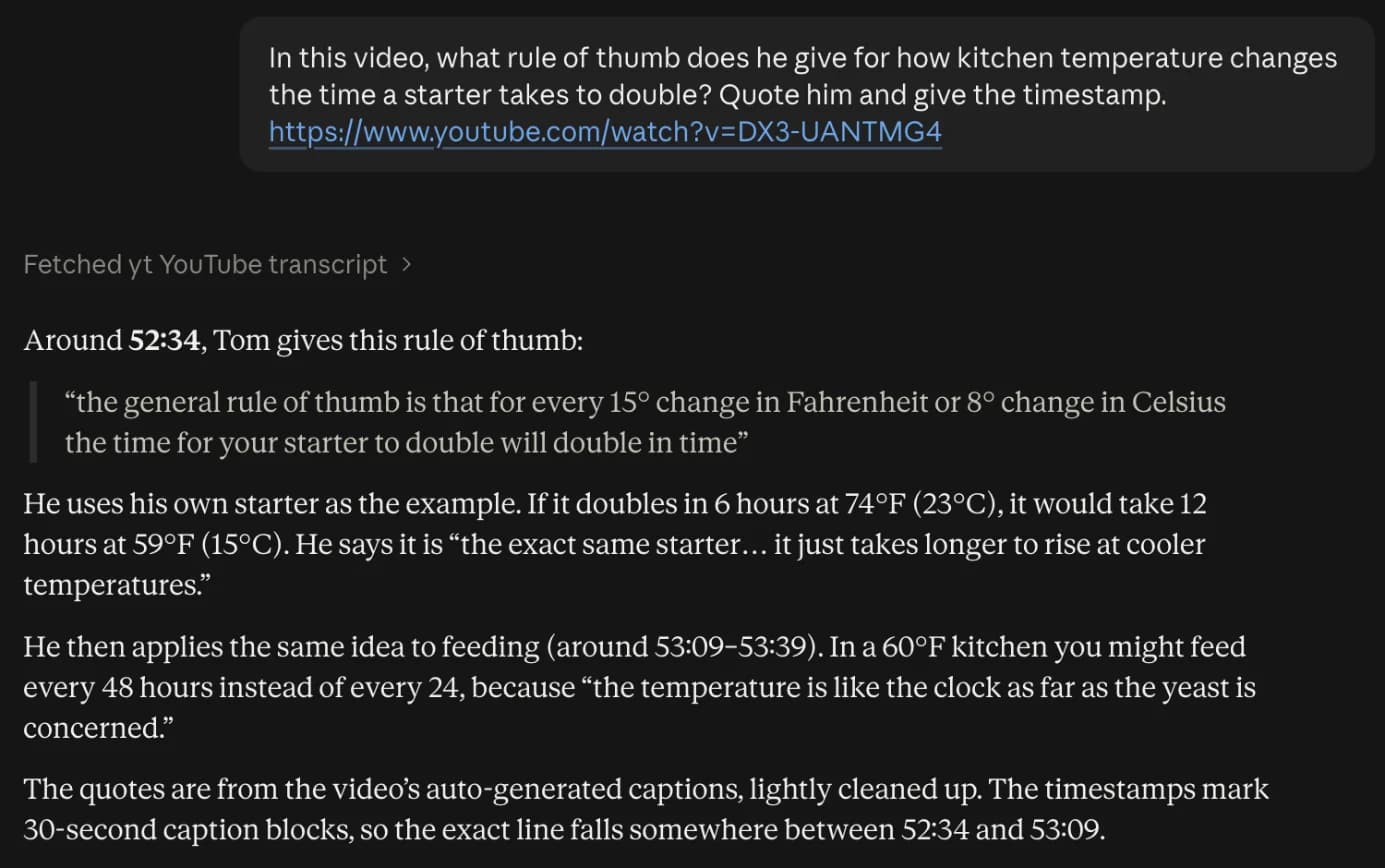
This is what the same sourdough question returns once the assistant can read the transcript (shown in Claude, which uses the identical server):
Prompts that only work with the transcript
@TranscriptAPI What does he say about X in this video? Quote him and give the timestamp. [link]
@TranscriptAPI Summarise this in 5 bullets with timestamps, from what is said rather than the description. [link]
@TranscriptAPI Turn this tutorial into a numbered checklist with every setting and value he mentions. [link]
@TranscriptAPI Find the video where @AndrejKarpathy explains tokenization and summarise the first 20 minutes.
@TranscriptAPI Translate the transcript of this video into German. [link]
The fourth prompt chains two tools: a channel search returns Let's build the GPT Tokenizer, and then the assistant reads its transcript. Translation uses extra credits, which scale with the length of the video.
Plus or Free: copy and paste
Without a connector you can still give ChatGPT the real words:
- Open the free YouTube transcript tool and paste the link. No account needed.
- Copy the transcript with timestamps.
- Paste it into ChatGPT with your question, for example: “Here is the transcript of a video. What rule of thumb does he give for temperature? Quote him.”
That is fine for one video. For a channel, a playlist or a daily routine, the connector saves the copying, and ChatGPT can search for the right video by itself.
Things it cannot do
- Videos without captions (creator turned them off, or YouTube never generated any) have nothing to read. The tool says so instead of guessing.
- Private, members-only and age-restricted videos are out of reach.
- It reads captions, not the picture. A silent screen demo stays silent.
- Custom MCP servers are web-only in ChatGPT; the mobile app cannot add them.
Frequently asked questions
Can ChatGPT watch YouTube videos?
No. ChatGPT does not open the video or its captions. When you paste a link it runs a web search and answers from the title, description, chapter list and articles about the video. That is often enough for a famous talk and never enough for a specific quote or a small channel.
Which ChatGPT plans can connect a custom MCP server?
According to OpenAI's help center (October 2026): Pro users can connect custom MCP servers with read/fetch permissions, Business workspaces let admins and owners add them, and Enterprise/Edu admins can grant the permission to members. Plus and Free are not listed. Custom MCP servers work on ChatGPT web only, not on mobile.
Does a read-only connection limit what TranscriptAPI can do?
No. All five TranscriptAPI tools only read — transcripts, YouTube search, channel uploads, channel search and playlists — so the read/fetch permission on Pro covers everything.
I am on ChatGPT Plus or Free. What can I do?
Copy the transcript with the free tool at transcriptapi.io/tools/youtube-transcript and paste it into the chat. No account needed, and it works with every plan.
What does it cost?
A free key has 20 credits and needs no card. Each transcript or search costs one credit, a transcript you already fetched is served from cache for free, and failed requests are refunded.
Every client, including Claude, Cursor and VS Code, is covered on the MCP server page. To call it from code instead, see the API docs.