Without help, Claude can open a YouTube page but not the captions behind it, so what it knows about a video is the title and description. TranscriptAPI is an MCP server: once it is added as a connector, Claude gets tools to fetch transcripts, search YouTube and browse channels and playlists, and it uses them whenever you paste a link.
claude.ai, Claude Desktop and mobile
1. Get a key
Sign in at transcriptapi.io/login and copy the key from the dashboard. It starts with ta_. The free key comes with 20 credits and doesn't need a card.
2. Add a custom connector
On claude.ai open Customize → Connectors, select Add, then Add custom connector.
TranscriptAPI
https://api.transcriptapi.io/mcp/ta_your_key
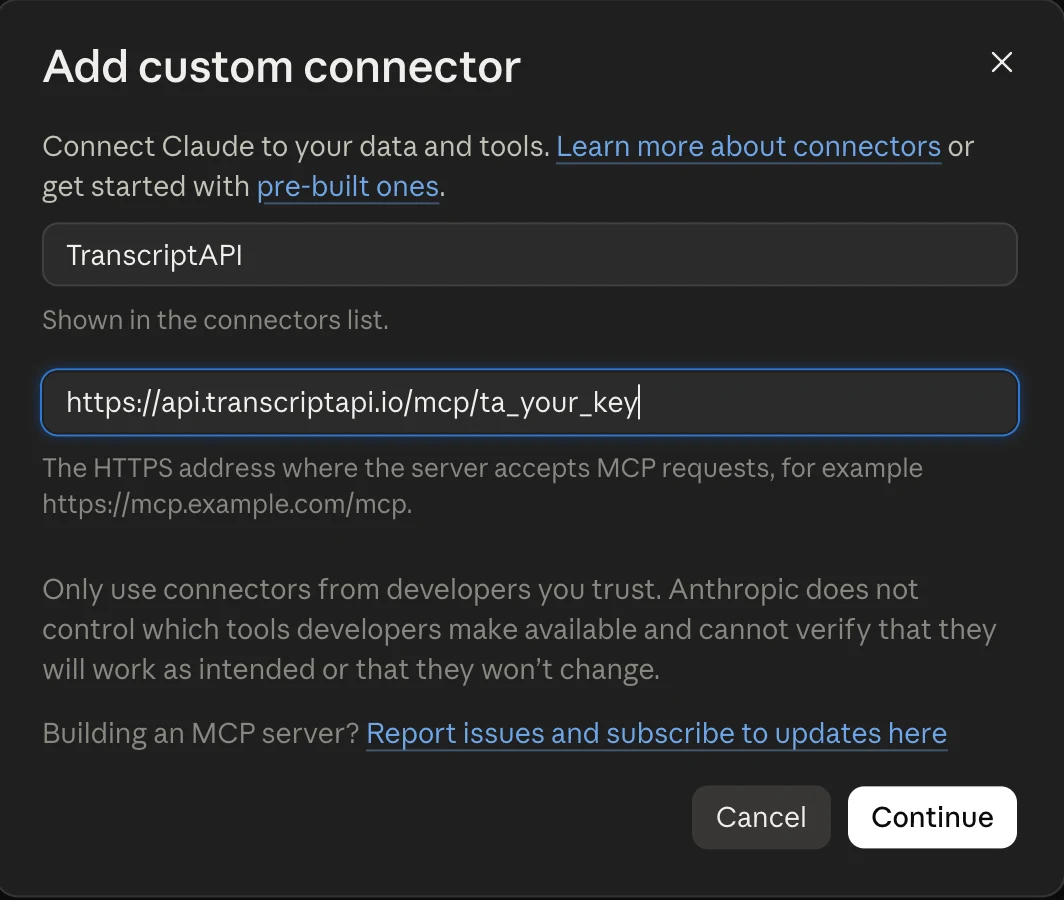
ta_your_key with your own key, then press Continue. The key sits in the URL because connectors cannot send headers, so there is no OAuth screen.The connector belongs to your account, so the Claude desktop and mobile apps pick it up as well. On Team and Enterprise plans an owner may need to allow custom connectors first.
3. Paste a link
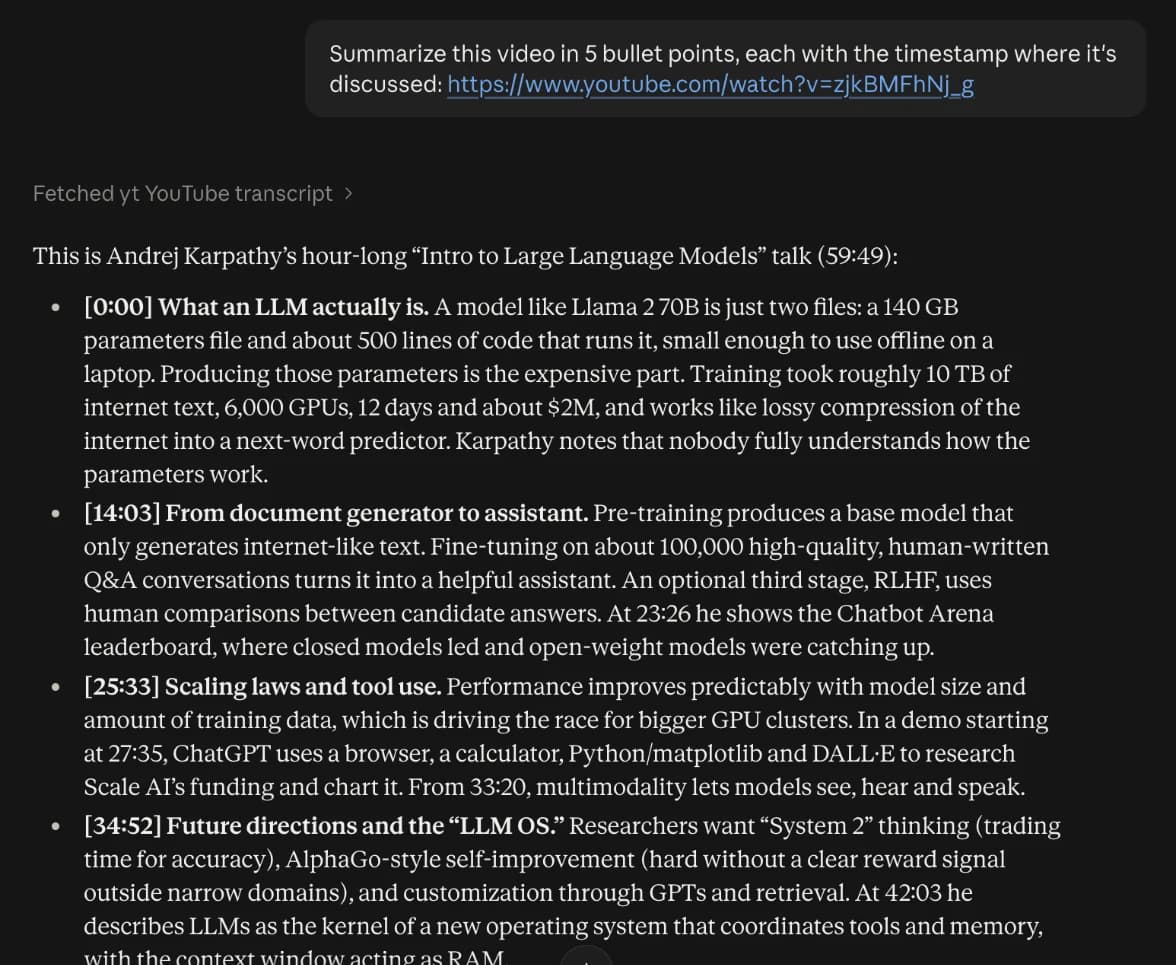
Nothing to switch on per chat. Paste a YouTube link with a question, and Claude calls the transcript tool by itself. You will see Fetched YouTube transcript above the answer:
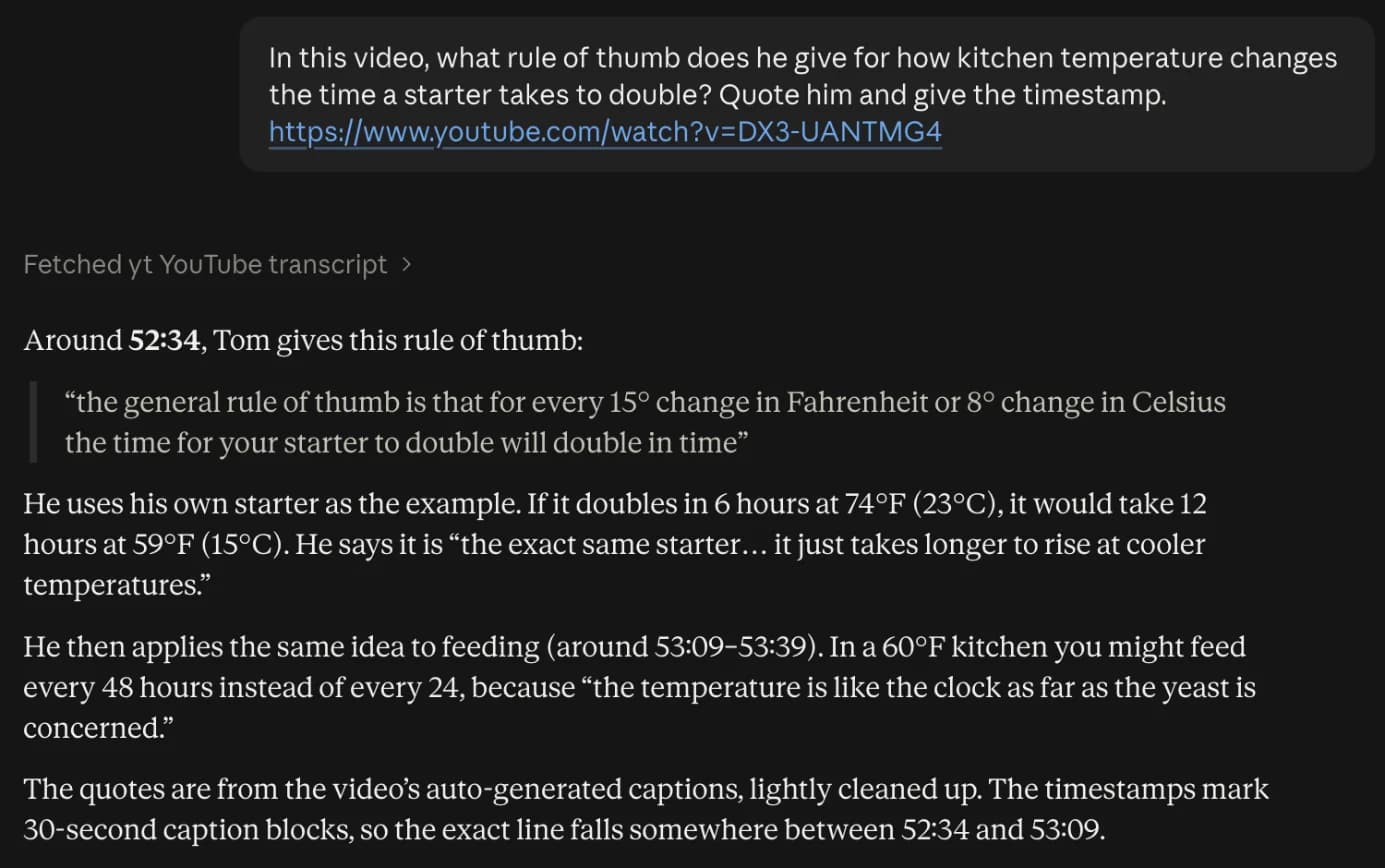
Quotes work the same way. Ask what the speaker says about something and you get their words and the timestamp:
Claude Code
Claude Code can send headers, so the key goes in a header and the URL stays clean:
claude mcp add --transport http transcriptapi \
  https://api.transcriptapi.io/mcp \
  --header "Authorization: Bearer ta_your_key"
Or run the server process on your own machine from npm, the same package every other MCP client uses:
claude mcp add transcriptapi \
  -e TRANSCRIPTAPI_KEY=ta_your_key \
  -- npx -y transcriptapi-mcp
Restart the session and run /mcp to check that transcriptapi is connected. In Claude Code this is useful for turning a tutorial into code: give it a conference talk or a library walkthrough and ask it to build what was shown.
What Claude can do with it
Five tools, and Claude chains them on its own:
get_youtube_transcript: the transcript, with timestamps, as plain text, SRT or VTT, optionally translatedsearch_youtube: find videos by keywordget_channel_videos: a channel's latest uploadssearch_channel_videos: find the video where a channel talks about somethingget_playlist_videos: a playlist, in order
Prompts that use them:
Find the video where @AndrejKarpathy builds a tokenizer and list every step he takes, with timestamps.
Summarise the last 5 uploads from @channel in 3 bullets each. Which one is about pricing?
Read this playlist and write a study guide: one section per video, key terms in bold. [playlist link]
Give me the SRT subtitles for this video, translated to Spanish. [link]
Search YouTube for reviews of X from the last year and compare what the reviewers disagree on.
For the first prompt, Claude searches the channel, finds Let's build the GPT Tokenizer (2 h 13 min), and reads the transcript. That's two credits.
Limits
- Videos without captions have no transcript; the tool says so, and the call is refunded.
- Private, members-only and age-restricted videos can't be read.
- It reads what is said, not what is shown on screen.
- Very long videos (three hours and more) use a lot of context. Ask for one part at a time if Claude starts skimming.
Frequently asked questions
Can Claude watch YouTube videos?
Not by itself. Claude can fetch the YouTube page, which gives it the title and description, not what is said. With a transcript connector it reads the captions with timestamps, so it can quote and summarise the actual content.
Do I have to set it up again for Claude Desktop and the mobile app?
No. A connector added on claude.ai belongs to your account, so it also appears in the Claude desktop and mobile apps. Claude Code is configured separately with one terminal command.
I don't see 'Add custom connector'.
On Team and Enterprise plans an owner may have to allow custom connectors first. If you are on a personal plan and the option is missing, update the app or use claude.ai in the browser.
What does it cost?
A free key has 20 credits and needs no card. Each transcript or search is one credit, a transcript you already fetched is free from cache, and failed calls (for example, a video without captions) are refunded.
Is it safe to put my key in the URL?
The URL is stored in your Claude account like any connector setting. Our access logs record the path as /mcp without the key, and you can rotate the key from the dashboard at any time.
Setup for Cursor, VS Code, Windsurf and other clients is on the MCP server page.